 Skip to content

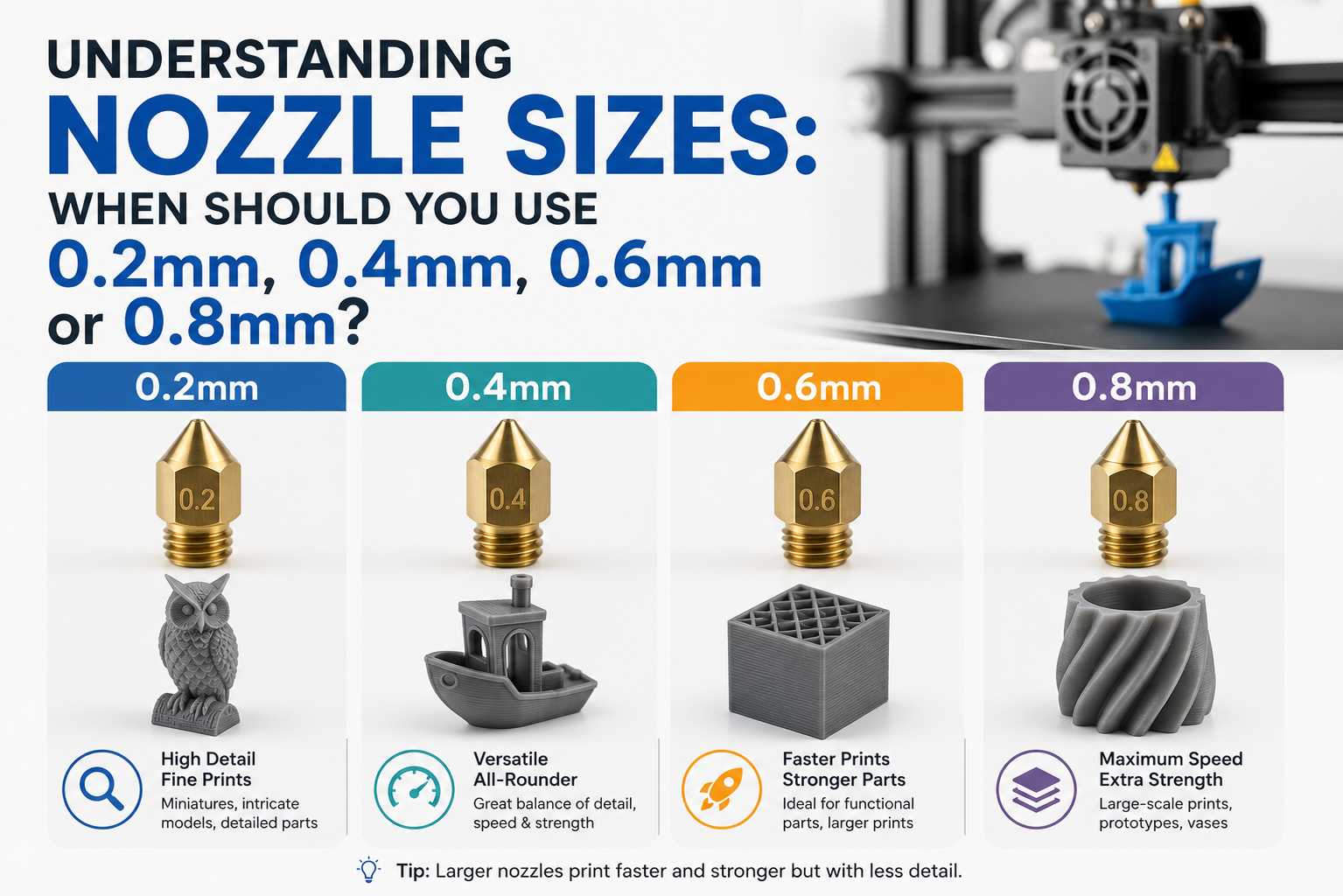
One of the simplest ways to improve your 3D printing results is by choosing the right nozzle size. While many desktop 3D printers come with a standard 0.4mm nozzle, it is not always the best option for every project. Different nozzle sizes can affect print speed, detail, strength, and overall print quality.
Whether you are printing detailed miniatures or large functional parts, understanding how nozzle sizes work will help you achieve better results while making the most of your printer.
Why Does Nozzle Size Matter?
The nozzle controls how much filament is extruded during printing. A smaller nozzle deposits thinner lines, while a larger nozzle allows more material to flow through at once.
Your choice of nozzle size can influence:
- Print resolution
- Printing speed
- Surface finish
- Layer strength
- Printing time
Selecting the right nozzle depends on the type of model you are printing rather than choosing the smallest or largest option available.
0.2mm Nozzle: Best for Fine Details
A 0.2mm nozzle is designed for prints that require high precision and intricate features.
Best Uses
- Miniatures
- Jewellery prototypes
- Small decorative models
- Architectural models
- Detailed figurines
Advantages
- Excellent print detail
- Smooth curves and edges
- Better reproduction of small features
- Cleaner text and engraved details
Limitations
- Longer printing times
- Higher risk of nozzle clogging
- Less suitable for abrasive materials
- Not ideal for large models
If appearance and precision are your priorities, a 0.2mm nozzle is an excellent choice.
0.4mm Nozzle: The All Round Performer
The 0.4mm nozzle is the most common size supplied with FDM 3D printers because it offers a balance between quality and efficiency.
Best Uses
- Everyday printing
- Hobby projects
- Household items
- Educational models
- General prototypes
Advantages
- Good balance of speed and detail
- Suitable for most filament types
- Reliable print quality
- Easy to maintain
Limitations
- Fine details may not match a smaller nozzle
- Large prints can take longer than with wider nozzles
For most users, a 0.4mm nozzle is the best starting point and works well for a wide range of applications.
0.6mm Nozzle: Faster Printing with Stronger Parts
A 0.6mm nozzle allows more filament to be extruded, making it a popular choice for larger prints and functional components.
Best Uses
- Mechanical parts
- Tool holders
- Storage organisers
- Workshop accessories
- Medium to large prototypes
Advantages
- Faster print times
- Stronger layer bonding
- Better reliability with specialty filaments
- Reduced risk of clogging
Limitations
- Less detailed surface finish
- Fine features may not print accurately
Many experienced users switch to a 0.6mm nozzle for everyday functional printing because it provides an excellent balance between speed and strength.
0.8mm Nozzle: Built for Large Projects
A 0.8mm nozzle is ideal when speed and durability are more important than fine detail.
Best Uses
- Large display models
- Furniture components
- Jigs and fixtures
- Industrial prototypes
- Large functional parts
Advantages
- Significantly faster printing
- Excellent layer strength
- Handles carbon fibre and filled filaments more effectively
- Lower chance of nozzle blockage
Limitations
- Reduced print detail
- Visible layer lines
- Small features may be lost
A larger nozzle is particularly useful when printing oversized objects where production time is a priority.
How to Choose the Right Nozzle Size
Before changing your nozzle, consider the following factors:
Choose a 0.2mm Nozzle If You Need
- Maximum detail
- Small models
- Fine text
- Smooth finishes
Choose a 0.4mm Nozzle If You Need
- General purpose printing
- Balanced performance
- Reliable results
- Everyday projects
Choose a 0.6mm Nozzle If You Need
- Faster printing
- Better performance with specialty filaments
- Medium to large models
Choose a 0.8mm Nozzle If You Need
- Large-scale printing
- Industrial applications
- Thick walls
- Reduced print times
Matching the nozzle size to your project will often produce better results than relying on default printer settings.
Tips for Changing Nozzle Sizes
Switching nozzle sizes requires a few adjustments to maintain print quality.
Remember to
- Update the nozzle diameter in your slicer software
- Adjust layer height to suit the new nozzle
- Recalibrate extrusion settings if required
- Check print speeds for optimal performance
- Perform a small test print before starting larger projects
These simple steps help ensure consistent results after changing nozzles.
Conclusion
There is no single nozzle size that works best for every 3D printing project. A 0.2mm nozzle delivers exceptional detail, while a 0.4mm nozzle remains the most versatile option for everyday printing. If speed and strength are your priorities, a 0.6mm or 0.8mm nozzle can significantly improve efficiency without sacrificing reliability.
Understanding the strengths of each nozzle size allows you to select the right tool for every print, resulting in better quality, reduced printing time, and more successful projects.